Cumulative Layout Shift (CLS)
Ever tried to click a button only to have it move at the last second, causing you to tap something else? That's a layout shift, and CLS increases these frustrating user experiences.
Cumulative Layout Shift (or CLS) is a measure of how much a webpage unexpectedly shifts during its life.
CLS is a measure of the largest burst of layout shift scores for every unexpected layout shift that occurs during the entire lifespan of a page.
To provide a good user experience, sites should strive to have a CLS score of 0.1 or less.
How is CLS calculated?
layout shift score = impact fraction * distance fraction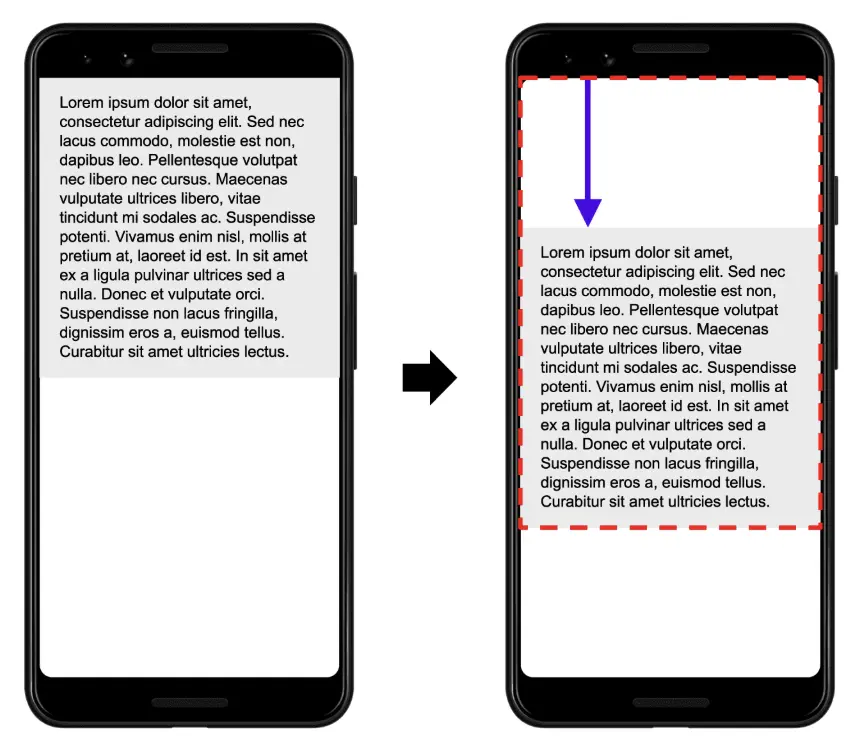
Impact Fraction: The union of the visible areas of all unstable elements for the previous frame and the current frame, as a fraction of the total area of the viewport is the impact fraction for the current frame.
In the image above there's an element that takes up half of the viewport in one frame. Then, in the next frame, the element shifts down by 25% of the viewport height. The red, dotted rectangle indicates the union of the element's visible area in both frames, which, in this case, is 75% of the total viewport, so its impact fraction is 0.75. (denoted by red border)
Distance Fraction: The distance fraction is the greatest distance any unstable element has moved in the frame (either horizontally or vertically) divided by the viewport's largest dimension (width or height, whichever is greater).
In the example above, the largest viewport dimension is the height, and the unstable element has moved by 25% of the viewport height, which makes the distance fraction 0.25. (denoted by arrow)
So, in this example the impact fraction is 0.75 and the distance fraction is 0.25, so the layout shift score is 0.75 * 0.25 = 0.1875.
Expected Layout Shifts
A layout shift is only bad if the user isn't expecting it. Layout shifts that occur within 500 milliseconds of user input (tap, click, or keypress) will be excluded from CLS calculations.
Note: scrolls, drags, or pinch and zoom gestures are not considered "user input".
What causes poor CLS?
- Images without dimensions: When images load without predefined width and height attributes, the browser doesn't know how much space to reserve, causing content to shift when the image finally loads.
- Ads, Embeds, and Iframes without dimensions: Third-party content that loads asynchronously without reserved space can push existing content around as it appears on the page.
- Dynamically injected content: Content added to the page after initial load (like banners, popups, or notifications) can shift existing content if space isn't reserved for it.
- FOIT (Flash of Invisible Text): When custom fonts are loading, text remains invisible and then suddenly appears, potentially changing the layout if the new font has different dimensions.
- Web fonts causing FOUT (Flash of Unstyled Text): Text is rendered with the browser's default font first, then swapped with the webpage's font, causing layout shifts if the fonts have different metrics.
- Stylesheets causing FOUC (Flash of Unstyled Content): When the browser paints unstyled content before CSS loads, the page shifts once styles are applied.
Optimizing CLS
- Always include
widthandheightattributes for images and video elements. - Reserve enough space (use loading skeletons with the
min-heightattribute) for any dynamic content. - Use server-side rendering for rendering elements that are user-personalized.
- Avoid animating with
topandleftproperties; instead, usetransform. The CSS transform property allows you to animate elements without triggering layout shifts: - Instead of changing the
heightandwidthproperties, usetransform: scale(). - Use preload hint to load critical fonts to avoid FOUT.
- Use
font-display: swapto prevent FOIT.